Optional community participation

HOW TO BUY.

A plain-English walkthrough for people who choose to participate in the WADDLESLIV community token through the Pump mobile app.

You do not need to own WADDLESLIV to support Waddles. Sharing his story, contributing useful information and following the public record are equally welcome ways to participate.

The final source of truth
CgozZUAkJXYYBEiCmbeECxkQzVihahtncDho7pX9pump

Verify this full contract address before every purchase. Names, tickers, photos and social accounts can be copied. If the contract address does not match exactly, STOP.

⚠ BUY AT YOUR OWN RISK

Assume you could lose 100%.

WADDLESLIV is highly speculative. Its price can fall sharply or go to zero. Buy only an amount you are genuinely comfortable losing in full.

You are solely responsible for safeguarding your own funds, account credentials, wallet access and transactions. The Justice for Waddles internal team does not accept responsibility for losses resulting from market movements, user error, lost credentials, scams, compromised devices, malicious links, incorrect wallet addresses, third-party platforms, account restrictions, hacks or other events outside the team's control.

Crypto transactions are generally irreversible. If you send assets to the wrong address, expose your credentials, approve a malicious transaction, lose access to your wallet, or suffer theft, the assets may be permanently unrecoverable.

A compromise of a project-team wallet, social account or other project infrastructure could also negatively affect the token or project. Blockchain transactions made by an attacker may be irreversible. Nothing on this page guarantees that losses can be recovered.

Purchase only if you understand and accept these risks.

Step 01

Download Pump and create your account.

Install the official Pump mobile app from your device's app store. Open it and create a fresh account using one of the sign-in methods offered by Pump.

During first-time setup, Pump can create a wallet associated with your account. Treat access to that account and wallet as seriously as you would treat online banking credentials.

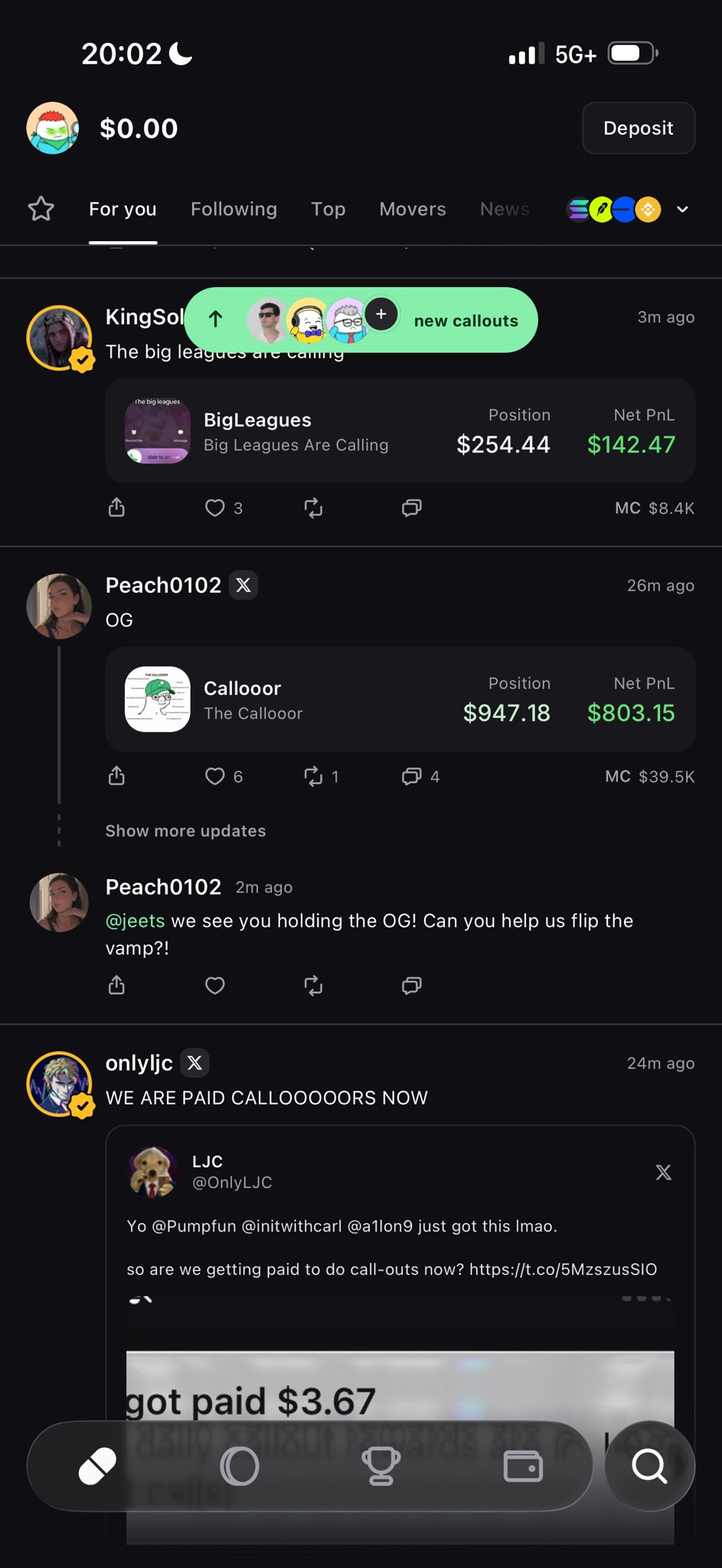
Pump main page after creating an account
After account creation, your balance may initially show $0.00. Tap Deposit.
Step 02

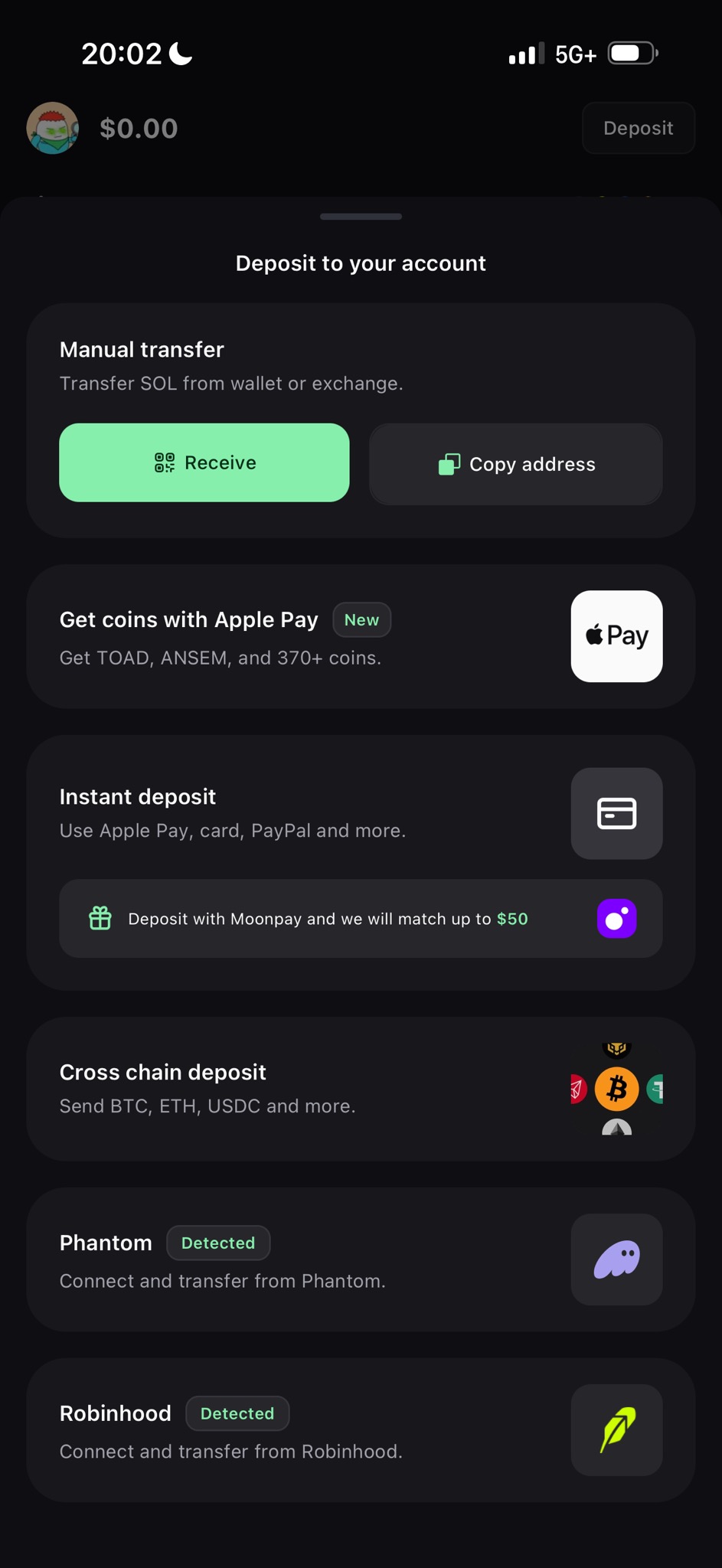
Tap Deposit and choose instant deposit.

Pump may show several ways to fund the wallet. For the simple card flow tested for this guide, choose the Instant deposit / MoonPay option.

Pump deposit selection screen showing MoonPay instant deposit
The tested mobile flow displayed MoonPay as an instant-deposit option.
Step 03

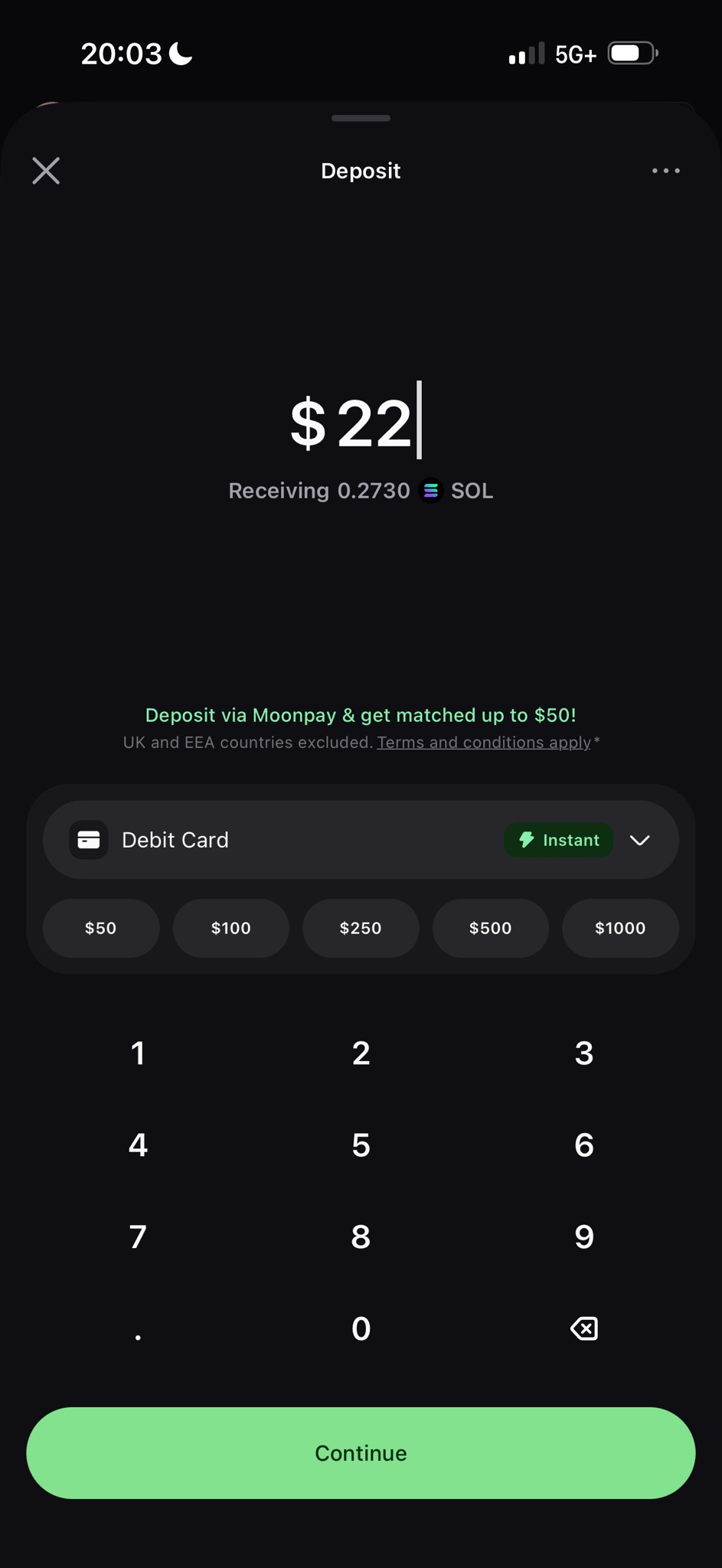
Enter the amount of SOL you want to fund.

In our internal mobile test on August 12, 2026, the interface required approximately $22 minimum for this card-deposit flow. Pump, MoonPay, market prices, fees and minimums can change, so rely on the amount shown in the app when you transact.

Purchase only an amount you are comfortable losing completely.

New to crypto? We strongly recommend starting with only the minimum amount shown by the app — approximately $22 in our August 12, 2026 internal test. That way, if you misunderstand a step, choose the wrong token, make a wallet mistake, or simply decide crypto is not for you, the amount at risk is kept relatively small. Never increase your purchase simply because the platform allows you to.
Pump deposit amount screen showing a 22 dollar SOL purchase
Internal test: $22 displayed as approximately 0.2730 SOL as of August 12th, 2026. SOL prices change continuously.
Step 04

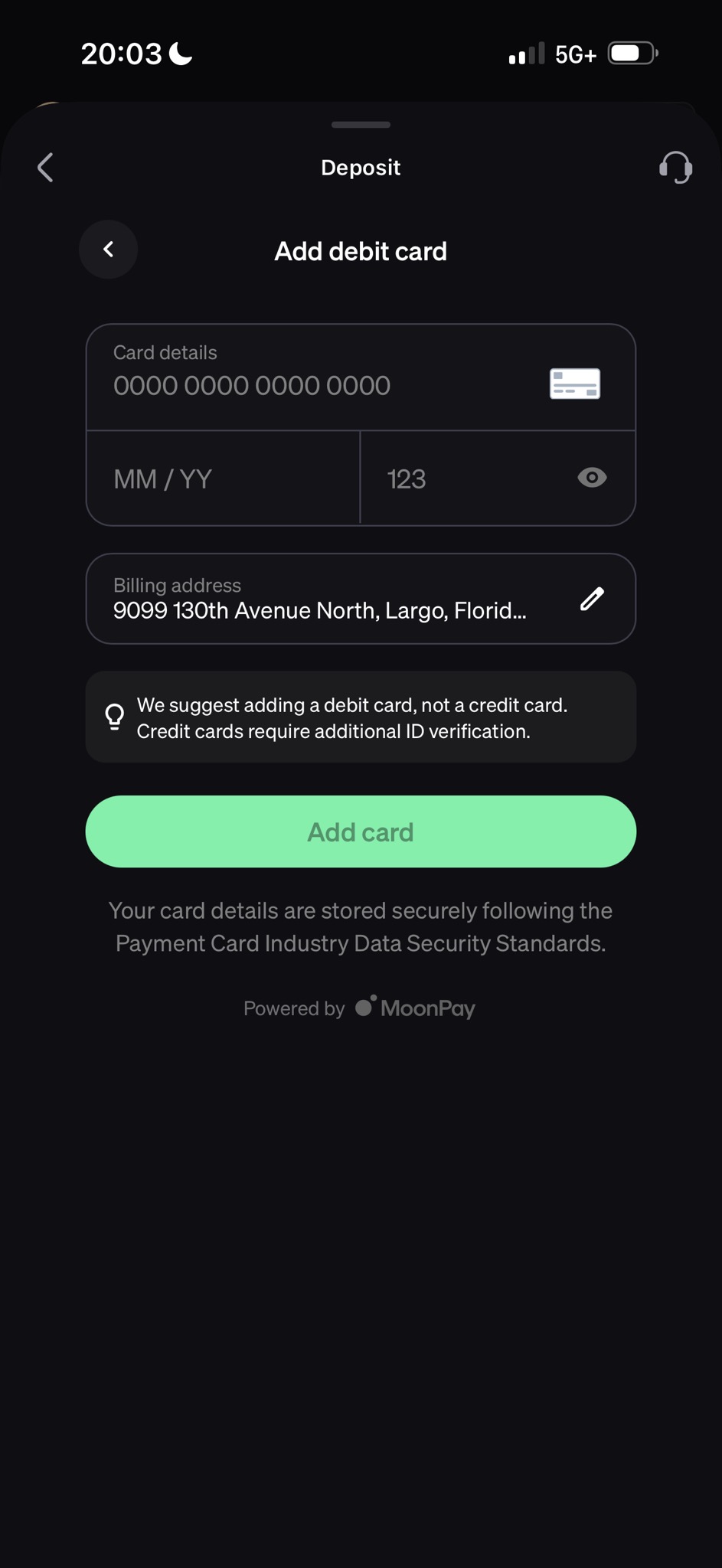
Prefer a debit card.

The tested flow specifically suggested using a debit card rather than a credit card. The interface noted that credit cards may require additional identity verification.

Expect Know-your-customer (KYC)The card purchase is handled by a third-party payment provider. You may be required to complete identity verification or other screening before approval.
Your bank may stop the purchase.Some banks restrict or block cryptocurrency transactions. You may need to complete a bank verification prompt or contact your bank.
Use a payment method in your own name. If a transaction is declined, check the provider and bank status rather than repeatedly retrying.
MoonPay debit card entry screen with billing address redacted
A debit card is recommended.
Step 05

Wait for the SOL to arrive.

Complete the payment provider's instructions and any requested verification. Once the transaction completes, return to Pump and confirm that your account shows the SOL you purchased before trying to buy WADDLESLIV.

A bank authorization is not the same thing as completed crypto delivery. If something appears delayed or declined, check the transaction status first.

Step 06

Find WADDLESLIV—and verify it before buying.

Search for WADDLESLIV or follow the official link from JusticeForWaddles.org. Do not rely on the token name, ticker, logo or photograph. Fake tokens can copy all of them.

Check again
CgozZUAkJXYYBEiCmbeECxkQzVihahtncDho7pX9pump

If the contract address is different by even one character, STOP.

WADDLESLIV token page in the Pump mobile app
Example WADDLESLIV page. Market cap, holders, price and other values will change.
Step 07

Choose your amount and review before confirming.

Tap the green WADDLESLIV buy control, enter only the amount you intend to spend, review the transaction details and fees, and confirm only after checking the contract address again.

Buying more than a few hundred dollars? Because WADDLESLIV is currently a small-market-cap token with limited liquidity, larger market buys can move the price significantly and may experience substantial slippage. If you choose to purchase a larger total amount, we recommend doing so in smaller increments — generally no more than about $100 at a time — and reviewing the quoted result before each transaction. This is not a guarantee that slippage will be low. Liquidity and market conditions can change quickly, so always review the amount of WADDLESLIV you are expected to receive before confirming.
  • I verified the full contract address.
  • I understand this is speculative and could lose all value.
  • I am using money I can afford to lose.
  • I understand blockchain transactions may be irreversible.
  • I reviewed the amount, fees and wallet before confirming.
✓ Purchase complete

You should now be holding WADDLESLIV.

Thank you for choosing to participate in the Justice for Waddles community. Please remember that holding the token is completely optional, and you remain free to sell some or all of your position whenever you choose.

Step 08

How to sell WADDLESLIV.

You are never required to hold WADDLESLIV. If at any point you decide that you would rather exit your position, Pump provides a sell function on the token page.

Return to the official WADDLESLIV page and, once again, verify that you are looking at the correct contract:

Official WADDLESLIV Contract
CgozZUAkJXYYBEiCmbeECxkQzVihahtncDho7pX9pump

The contract address remains the final source of truth — even when selling.

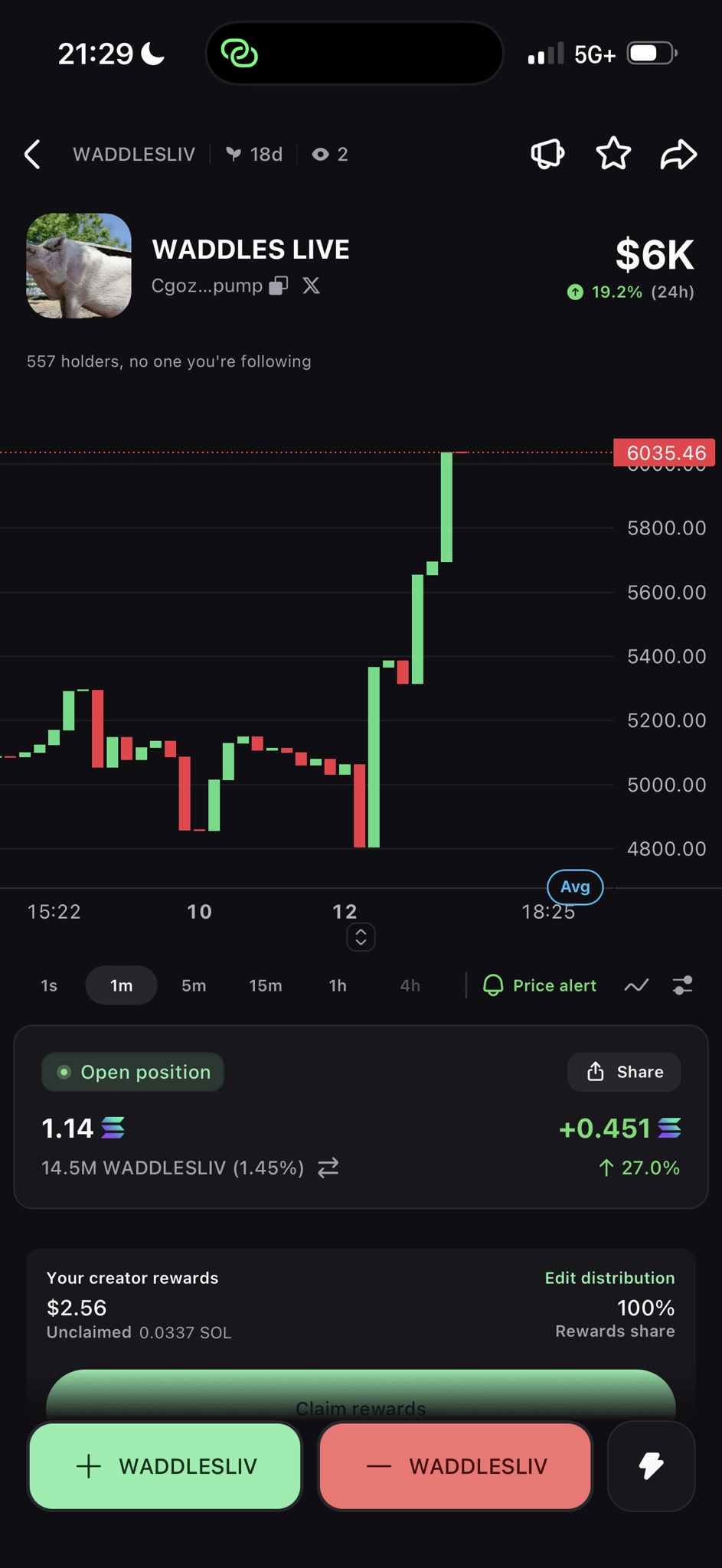
On the Pump token page, select the red Sell WADDLESLIV control, choose the amount you wish to sell, review the quoted transaction and fees, and confirm the transaction.

Selling converts your WADDLESLIV position back into SOL. The dollar value you receive depends on the token price, available liquidity, slippage, transaction fees and the market at the moment your trade executes. A displayed market value is not a guarantee of what a sale will produce.
WADDLESLIV token page showing buy and sell controls in Pump
The red WADDLESLIV button is the sell side of the Pump interface. Market values shown in this screenshot are historical and will change.
Step 09

Move the SOL somewhere you can cash out.

After selling, you will generally have SOL in your Pump wallet rather than dollars in your bank account. To turn that SOL into ordinary cash, you can send it to a crypto service that supports receiving SOL and withdrawing dollars to your bank.

For beginners in the United States, we find Robinhood's interface relatively straightforward. Robinhood supports receiving SOL, selling supported crypto, and withdrawing available cash to a linked bank account.

1. Open Robinhood Create or sign in to your Robinhood account and complete any identity verification Robinhood requires.
2. Find your SOL receive address In Robinhood, select the crypto transfer/receive function for Solana (SOL). Robinhood will display the deposit address associated with your account.
3. Send SOL from Pump From your Pump wallet, initiate a SOL withdrawal or transfer and paste the Robinhood SOL deposit address.
4. Verify before sending Confirm that both sides are using the Solana network and carefully compare the destination address before approving the transfer.
⚠ IMPORTANT

Crypto transfers cannot normally be reversed. Sending SOL to an incorrect address or using an incompatible network can permanently destroy your ability to recover those funds.

If you are new to crypto and moving a meaningful amount, consider sending a very small test transfer first. Confirm that it successfully appears in your Robinhood account before sending the remainder.

Step 10

Sell the SOL and withdraw your money.

After the SOL arrives in Robinhood, open SOL in the Robinhood app, choose Sell, enter the amount you wish to sell, review the order and submit it.

Once you have available cash, use Robinhood's Transfers → Withdraw controls to send eligible funds to your linked bank account.

Robinhood's availability, supported assets, account requirements, transfer limits, settlement periods and fees can change. Follow the instructions displayed in your own account at the time of withdrawal.

Robinhood currently says crypto-sale proceeds become available immediately for additional trading, although withdrawing those proceeds to a bank can remain subject to its ACH settlement period. Standard ACH withdrawals are generally free, while eligible instant withdrawals can carry an additional fee.

When should you sell?

That decision belongs entirely to you. Justice for Waddles does not set a recommended selling price, profit target or holding period. You are free to sell some, all or none of your tokens whenever you choose, subject to the market and platform being available.
Support

Need help? Be extremely careful who you trust.

An official Justice for Waddles support email for token-related questions will be published on this website soon.

⚠ SCAM WARNING

Until an official support address is published here, no one emailing you about WADDLESLIV should be treated as official support.

If someone contacts you claiming to represent Justice for Waddles, WADDLESLIV, Pump, or the internal team and asks for your password, recovery phrase, private key, wallet export, remote access, payment, or a transaction approval, do not engage.

Never share a seed phrase, private key, password, authentication code, or wallet backup with anyone. Legitimate support should never need these.

When the official support email is established, it will be listed directly on justiceforwaddles.org. Treat the website itself as the source of truth for official contact information.

Project disclosure

Know what participation does—and does not mean.

WADDLESLIV is an optional community token. Purchasing it does not give you ownership of Justice for Waddles, Waddles, a legal claim, a right to repayment, or any promise of profit or appreciation.

There is no expectation or request that supporters hold WADDLESLIV indefinitely. Participants are free to sell their tokens whenever they wish. The project will not criticize or penalize community members for choosing to exit a position.

The internal project team retains discretion over its own token holdings and, unless a specific commitment is expressly stated, over creator or marketing proceeds it receives. Team-held tokens may be retained, transferred or sold at the team's discretion at any time, which may affect the market price of the token. Where project proceeds are used for advocacy, research, case-related work, marketing or appropriate Waddles-related costs, the goal is to communicate those uses transparently.

Nothing on this page is financial, investment, legal or tax advice. Platform availability, payment methods, KYC requirements, limits, prices and fees can change. Always review the current terms shown by Pump and its payment provider before proceeding.